
Running a growing business today often means managing stock across stores, warehouses, and online channels. When items sit in many places, keeping everything aligned becomes harder each day. That is why many leaders ask why multi locations inventory management is essential for scaling.
The answer is simple. It gives clear stock visibility, faster order handling, and better control across every location. Teams can move products where demand rises and avoid waste or delays. A strong system also prepares businesses to expand into new regions. Continue reading to learn how this approach supports real growth.
Reasons Multi Locations Inventory Management Is Essential for Scaling
Growing a business gets hard when stock sits in many places, and nothing lines up. You need clear control if you want to move fast and avoid mistakes. Read the points below to learn why this system is key to real growth.

Better Control Over Stock In Many Places
Keeping stock in many places can get messy fast. When each site tracks items in a different way, simple tasks take longer. Clear tools bring each site together so you see all stock at once. This stops mix-ups and helps teams work with less stress and more speed.
Faster Order Fulfillment For Customers
A strong system makes it easy to pick the closest site for each order. Doing this cuts wait times and boosts happy buyers. It also helps stores send items to each other when stock runs low. This setup keeps your orders smooth when demand rises.
Lower Risk Of Stockouts And Overbuying
Good tracking shows what you have and what you need. With this view, you do not buy too much or run out fast. It helps leaders plan smarter while saving money. You also avoid rush orders, which often cost more and slow down other tasks.
Clear Data To Plan For Growth
Strong data lets you know which place sells what and when. This makes it easy to plan the right amount of stock in each area. You can move items before they sit too long or run dry. Clear reports help leaders make choices with less guesswork and risk.
Smooth Transfers Between Sites
Moving items from one place to another can save both time and cost. A good system gives clear steps for each move so nothing gets lost. Teams see where items are at all times. This keeps stores stocked and ready during busy days or peak seasons.
Easy Path To Add New Sites As You Grow
A strong system makes it simple to add new stores, hubs, or regions. As your brand expands, multi locations inventory management helps keep every new site aligned with your main stock system. Clear steps guide teams so new sites start fast without trouble. This lets your business grow without losing control of daily tasks.
Support For Both Online And Store Sales
Many brands sell on sites and in shops at the same time. Without one system, stock updates come late and cause double sales. A linked setup updates all places at once. It helps stores know what is real and gives buyers a smooth shopping experience.
Lower Operating Costs Across All Locations
When stock moves with care, waste drops, and storage stays simple. Clear tools stop items from piling up in the wrong place. You also avoid buying extra stock that sits too long. These steps help each site run better and cost less over time.
Challenges Businesses Face Without a Centralized Multi Locations Inventory System
It may seem simple to expand a business with multiple stock locations, but without a single shared system, things quickly fall apart. Teams start guessing, orders slow down, and simple mistakes turn into big issues. Below are the key challenges businesses face without a centralized multi locations inventory system.
1. No Clear View Of Total Stock
Without one system, each site works with its own numbers. This creates confusion and slows down daily work. Key problems:
- Wrong stock counts
- Slow answers for team members
- Poor reports for business decisions
2. Stockouts And Overstocking
Some sites run out while others have too much. This happens because no one sees real-time stock. This leads to:
- Lost sales and unhappy buyers
- Storage waste
- Higher costs from rush orders
3. Slow Order Fulfillment
Teams take longer to choose the best site for each order because the data is unclear. This causes:
- Delayed shipping
- More manual work
- Higher risk of sending the wrong items
4. Weak Transfer Tracking Between Sites
When stock moves between stores, tracking is often done by hand. Main issues:
- Lost items
- No record of movement
- Delays that hurt sales
5. Hard To Predict Demand
Scattered data makes it hard to know what each area needs. This results in:
- Wrong forecasts
- Missed sales chances
- Buying items that do not sell well
6. More Errors From Manual Work
Teams update sheets or messages by hand, which slows things down. Risk points:
- Double-selling
- Wrong stock updates
- Time wasted checking numbers
7. Higher Operating Costs
Poor tracking and slow decisions increase costs across all sites. This includes:
- Extra storage
- Emergency restocks
- Waste from items that sit too long
8. Hard To Scale And Add New Locations
Without one system, each new site takes more time, training, and setup. This leads to:
- Slow expansion
- More mistakes
- Systems that break as the business grows
Future Trends in Multi-Location Inventory Management
Inventory systems are changing fast as brands expand across many regions and manage stock in multiple locations. New tools help teams work faster, avoid errors, and keep inventory aligned across all sites. The points below show key future trends in multi-location inventory management.
- Automation in Inventory Tasks: Automation tools now handle routine inventory tasks like stock updates, reorder alerts, and shipment tracking without manual effort. Businesses save time, reduce human errors, and keep inventory records accurate across every store and warehouse location daily.
- AI-Based Demand Forecasting: Artificial intelligence studies past sales, seasons, and buying patterns to predict future demand with better accuracy. This helps companies place the right stock in the right location before shortages or excess inventory problems appear.
- Robotics in Warehouses: Warehouse robots move goods, sort packages, and pick products quickly for packing and shipping processes. Faster movement of items improves order speed and keeps multi-location inventory operations smooth during busy sales periods.
- Real-Time Data and Smart Dashboards: Modern inventory tools show real-time stock data from every location inside simple dashboards. Managers quickly see shortages, slow products, and transfer needs without checking each store separately.
- Cloud-Based Inventory Systems: Cloud systems store inventory data online so teams from different locations can access the same information anytime. This makes updates faster, improves collaboration, and keeps every location working with accurate inventory numbers.
- Smart Sensors and IoT Tracking: IoT sensors track product movement, storage conditions, and stock levels automatically inside warehouses and stores. These smart devices help businesses maintain accurate counts and prevent loss, damage, or misplaced inventory items.
Who Needs Multi-Location Inventory Management System the Most?
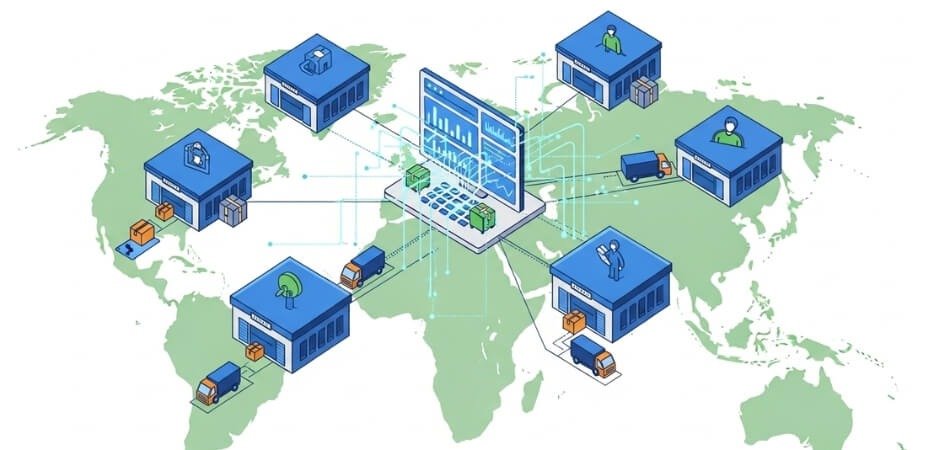
Many brands grow fast and add new stores, sites, or online channels. Keeping stock in order becomes hard when data sits in many places. Read the points below to see who needs a multi location inventory system the most.
Retail Brands With Many Stores
Running many stores makes stock control tough and slow. Teams need one clear system to track items and avoid lost sales. This setup keeps each store updated with the same data. It also helps move stock fast when one store runs low.
Ecommerce Brands With Many Warehouses
Online brands use more than one warehouse to ship fast across regions. Without one system, stock updates come late and cause double sales. A linked setup shows real-time numbers across all hubs. It also picks the best place to ship each order quickly.
Brands Selling Online And In Stores
Teams working across online and store channels struggle with mixed stock counts. A strong system updates all places at the same time. This stops overselling and keeps orders smooth. It also gives buyers a steady and simple shopping experience.
Growing Startups Expanding To New Locations
Small brands that grow into new areas need clear stock control tools. Simple sheets break fast when more sites open. A shared system helps teams set up new sites with ease. It guides daily tasks and keeps stock data clean for all users.
Wholesale And Distribution Companies
Large stock loads move often between sites, so strong control is key. A single system lets teams check real-time counts and plan moves quickly. It also lowers errors during bulk transfers. Clear data helps leaders avoid stock waste and shipping delays.
Seasonal And High-Demand Businesses
Brands selling fast during peak days face sudden stock problems. One system warns teams when items run low. It also helps place stock in the right areas before demand spikes. This keeps orders moving even when sales rise without warning.
Best Practices for Multi-Location Inventory Success
A strong inventory setup helps brands keep every site in sync and run daily tasks with less stress. Good habits and clear tools make stock control easier across stores, hubs, and regions. The best practices below show how to manage multi location inventory with steady and reliable results.
| Best Practice | What It Means | Why It Helps |
| Use Centralized Inventory Systems | Track all stock from one place and update all sites in real time. | Gives clear data, stops errors, and keeps every location in sync. |
| Standardize Processes And SKU Tagging | Use the same labels, codes, and steps at all sites. | Makes tracking easy, cuts mistakes, and speeds up daily work. |
| Monitor KPIs And KPI Dashboards | Check key numbers like stock turns, order speed, and fill rates often. | Helps teams spot issues early and fix problems before they grow. |
| Automate With Modern Inventory Tools | Use systems that handle tasks like updates, alerts, and transfers. | Saves time, reduces errors, and supports faster order fulfillment. |
Additional Tips For Strong Multi-Location Inventory Control
Strong Team Training
- Teach teams how to use the same tools and terms at every site.
- Give simple guides so new staff can learn fast and keep stock data clean.
Real-Time Stock Forecasting
- Use tools that study past sales to predict future stock needs.
- Place items in the right area before demand rises.
Clear Transfer Rules Between Locations
- Set simple steps for sending stock to other sites.
- Track each move so items never get lost or delayed.
Regular System Audits
- Check stock tools often to find weak spots and fix them early.
- Keep all locations updated with the latest rules and settings.
Set Safety Stock Levels
- Keep extra units of key items at each site to avoid stockouts.
- Review this level often as demand changes.
Frequently Asked Questions
Many readers look for clear answers before building or upgrading a multi location inventory system. The FAQs below cover common questions found through search data and GEO trends.
How Can a Business Choose the Right Inventory Software?
Leaders should check ease of use, growth support, pricing, and how well it links with current sales channels. A demo or trial also helps teams test the system before making a final choice.
What Security Steps Should Multi-Location Inventory Tools Follow?
Good tools protect data with secure logins, access controls, and safe cloud storage. These steps keep stock records and site information safe from unwanted changes.
Why Should Teams Use Barcode or RFID Tools in Multi-Location Setups?
Barcode and RFID tools help track items faster and with fewer errors. They also make stock counts easy and help teams keep numbers updated at all times.
What Problems Can Old or Outdated Inventory Systems Create?
Older tools can slow updates, freeze during busy hours, or fail to link with new sales channels. These issues cause wrong stock numbers and slowdowns across all locations.
How Often Should Inventory Data Be Checked or Updated?
Most brands review data daily or weekly to make sure stock levels match real usage. Regular checks help teams spot issues early and keep all locations aligned.
What Training Do Teams Need for Multi-Location Inventory Success?
Teams need simple guides that explain stock steps, scanning rules, and how to use shared tools. Clear training keeps every site working in the same way.
Which Hidden Costs Should Brands Watch For When Managing Many Locations?
Extra costs may come from storage fees, old stock, software add-ons, or rush shipping. Watching these hidden costs helps brands plan smarter and avoid waste.
Conclusion
Growing brands often struggle when stock sits across many stores, warehouses, or sales channels. Clear systems fix this problem by keeping every location connected. This explains why multi locations inventory management is essential for scaling. It gives full stock visibility, speeds up orders, reduces waste, and supports smarter planning.
When businesses use one system for all sites, teams work faster and make fewer mistakes. Tools like automation, data dashboards, and clear processes help companies grow without losing control. With the right setup, brands can expand into new regions, handle higher demand, and keep customers satisfied.