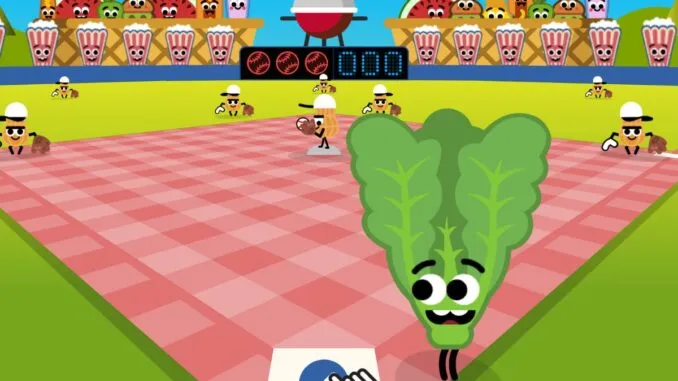
Google Doodle Baseball is a free browser game released by Google on July 4, 2019. The interactive Doodle celebrates U.S. Independence Day through a playful backyard baseball game featuring popular summer foods as players.
Instead of professional athletes, the batting team includes animated characters such as a hot dog, hamburger, pizza slice, corn cob and ice cream cone. The pitchers are peanuts, and the spectators include other food-themed characters.
The game is easy to start because it uses a single batting control. However, scoring a high number of runs requires careful timing, patience and quick adjustment as the pitches become more difficult.
Quick Answer
Google Doodle Baseball is a free batting game created for U.S. Independence Day on July 4, 2019. Click or tap the swing button when the ball reaches the batter. You score runs by hitting safely, while longer hits may produce doubles, triples or home runs. Your turn ends after three strikes.
What Is Google Doodle Baseball?
Google Doodle Baseball is an interactive game that temporarily replaced the standard Google homepage logo in 2019. Google officially described it as a backyard barbecue ball game in which classic American summertime snacks step up to the plate.
The game combines three familiar ideas:
- Baseball
- Fourth of July celebrations
- Backyard barbecue food
Its colorful animation and simple controls make it accessible to people who may not understand every rule of professional baseball.
Players control only the batter. The computer handles pitching, base running, fielding and scoring automatically. This keeps the game focused on one skill: timing the swing correctly.
The game can still be accessed through Google’s official Fourth of July 2019 Doodle page.
When Was Google Doodle Baseball Released?
Google released the game on July 4, 2019, to celebrate Independence Day in the United States.
Some third-party articles incorrectly connect its release with the 2019 MLB All-Star Game. However, Google’s official Doodle page clearly identifies the event as a Fourth of July celebration.
The backyard setting, food characters and summer atmosphere support this theme. Foods commonly associated with American cookouts become batters, fielders and spectators.
How to Play Google Doodle Baseball
You can play Doodle Baseball using a computer, phone or tablet with a supported web browser.
Follow these steps:
- Open the game page.
- Wait for the animation and playing field to load.
- Click or tap the play button.
- Watch the pitcher carefully.
- Click or tap the bat button when the ball approaches the batter.
- Continue hitting to score as many runs as possible.
- Avoid missing three pitches.
The game ends after the third strike. Your final score shows the total number of runs earned during that turn.
Google Doodle Baseball Controls
The game uses simple one-button controls.
On a Computer
Use the mouse or trackpad to click the swing button. Depending on the browser and version being played, a keyboard input may also work, but clicking the visible button is the clearest method.
On a Phone or Tablet
Tap the on-screen swing button when the pitch reaches the correct position.
You do not manually control the runners or fielders. Once the ball is hit, the game decides whether it becomes an out, single, double, triple or home run.
How Scoring Works
Google Doodle Baseball uses simplified baseball scoring. A successful hit can move the animated runners around the bases.
You may hit:
- A single
- A double
- A triple
- A home run
The exact result depends on how far the ball travels and whether the fielding team catches or stops it.
A home run sends the ball beyond the playable field and allows the batter and any runners already on base to score. A grand slam can occur when all three bases are occupied before a home run.
The number displayed on the scoreboard represents runs rather than the number of successful hits.
What Counts as a Strike?
A strike occurs when the batter swings and misses the ball.
Three strikes end the game. Unlike a complete professional baseball game, there are no multiple innings or another team’s batting turn. The challenge is simply to keep the hitting streak alive for as long as possible.
The game may also count a failed swing as a strike when the player clicks too early or too late.
Because only three mistakes are allowed, a controlled swing is more useful than clicking repeatedly.
How to Improve Your Swing Timing
Swing timing is the most important part of Google Doodle Baseball.
Watch the Ball, Not the Pitcher
The pitcher’s animation can be distracting. Focus on the ball after it leaves the pitcher’s hand.
Track its path toward the batter and swing when it reaches the hitting area.
Wait Before Swinging
Many new players swing immediately after the pitch begins. This usually causes an early strike.
Allow the ball to travel across most of the screen before clicking.
Avoid Rapid Clicking
Repeated clicking does not increase the chance of making contact. It can make timing less accurate.
Use one deliberate click for each pitch.
Learn From Each Miss
A strike gives useful information.
If the swing happens before the ball arrives, wait slightly longer on the next pitch. If the ball has already passed the batter, click earlier next time.
Small timing adjustments are more effective than making a completely different swing.
Expect the Pitch Speed to Change
Later pitches may not arrive at exactly the same speed or angle. Do not rely only on the timing of the previous pitch.
Follow each ball individually.
Tips for Scoring More Runs
No method guarantees a particular score because the pitches and results can vary. However, these practical tips may help.
Use a Larger Screen
A larger display can make it easier to see the ball’s movement. If you struggle on a small phone screen, try playing on a laptop, desktop computer or tablet.
Reduce Distractions
Close unnecessary tabs, silence notifications and keep your pointer near the swing button. This helps you focus on the pitch.
Check Your Internet and Browser
The game may feel harder if it is loading slowly or the animation is not running smoothly.
Try refreshing the page, closing background applications or using an updated browser.
Play With Sound
The sound effects may help some players recognize the rhythm of the pitch and swing. Other players may focus better without sound, so test both options.
Focus on Contact First
Trying to force a home run can cause poor timing. Your first goal should be making clean contact.
Long hits will come naturally when the swing connects at the right moment.
Take a Short Break
After several failed attempts, reaction time may become less consistent. A short break can help you return with better focus.
Google Doodle Baseball Characters
The official game uses food-inspired baseball players. Google also created character cards with names and illustrations.
H-Dog
H-Dog is an animated hot dog and one of the game’s most recognizable characters. The name combines “hot dog” with the style of a sports nickname.
Triple
Triple is a hamburger character. The name refers to a baseball hit that allows the batter to reach third base.
Wild Slice
Wild Slice is a slice of pizza. The name connects the character’s shape with the baseball term “slice.”
The Cobbra
The Cobbra is a corn-on-the-cob character. Its name combines “cob” with “cobra” and may also reference baseball legend Ty Cobb through Google’s original wordplay.
2 Scoops
2 Scoops is an ice cream cone with two scoops. The character adds another classic summer food to the batting lineup.
The Sauce
The Sauce is a ketchup bottle. It fits naturally into the backyard barbecue theme.
Big Red
Big Red is a watermelon character. Watermelon is commonly associated with summer gatherings and outdoor meals.
Sluggin’ Sirloin
Sluggin’ Sirloin is a steak character. The word “slugger” is often used for a powerful baseball hitter.
The game may show additional food characters during different plays and animations.
Why Food Characters Were Used
The characters connect baseball with the Fourth of July cookout theme.
Baseball is strongly associated with American summer culture, while foods such as hot dogs, hamburgers, watermelon, corn and ice cream are familiar at outdoor celebrations.
Turning these foods into players gives the game a clear visual identity. It also makes the Doodle feel welcoming to casual players and children rather than presenting it as a serious sports simulator.
Who Created the Game?
Google lists the following contributors in the official Doodle credits:
- Jacob Howcroft, David Lu and Megan Valentine worked on engineering.
- Matt Cruickshank provided art direction.
- Matt Cruickshank, David Lu and Jacob Howcroft worked on animation.
- Vishnu Ganti handled UX design.
- Colin Duffy served as producer.
- Silas Hite worked on sound.
- Jessica Yu was the Doodle team lead.
Including these credits is important because interactive Doodles are created by teams of engineers, artists, animators, designers and producers rather than by one unnamed developer.
Can You Still Play Google Doodle Baseball?
Yes. Although the game no longer appears automatically on Google’s homepage, it remains available through Google’s Doodle archive.
Players can also find versions on other websites, including Baseball Google Doodle. However, Google’s own archive is the safest place to confirm that you are playing the original 2019 Doodle.
Be careful with third-party websites that:
- Ask you to download unknown software
- Request unnecessary personal details
- Display misleading download buttons
- Open repeated pop-up advertisements
- Claim to offer an “official” mobile application without proof
The original Google Doodle runs in a web browser and does not require a separate game installation.
Does Google Doodle Baseball Work on Mobile?
The original game is designed to work through a compatible browser. It can generally be played on desktop computers, phones and tablets.
On mobile devices, the batter is controlled by tapping the screen button. Performance can depend on the browser, device, screen size and internet connection.
If the game does not load:
- Refresh the page.
- Check the internet connection.
- Update the browser.
- Turn off an aggressive ad or script blocker for the official page.
- Clear outdated browser data.
- Try another supported browser.
Why the Game Became Popular
Google Doodle Baseball remains memorable because it removes most barriers found in traditional games.
It is:
- Free to play
- Easy to understand
- Available in a browser
- Suitable for short playing sessions
- Colorful and family-friendly
- Connected with a familiar sport
- Challenging enough to encourage replaying
A player can understand the main objective within seconds but may spend much longer trying to beat a previous score.
This balance between simple controls and increasing difficulty gives the game lasting replay value.
Is Google Doodle Baseball Educational?
The game was created mainly for entertainment and celebration, not as a formal educational tool.
However, it can introduce basic ideas such as:
- Strikes
- Bases
- Home runs
- Batting timing
- Scoring runs
- Hand-eye coordination
It can also lead users to learn more about the cultural connection between baseball, summer and Independence Day.
The game should not be treated as a full explanation of baseball because it removes pitching control, fielding decisions, innings and many official rules.
Is There a Google Doodle Baseball World Record?
Google does not provide an official global leaderboard or verified world-record system for the game.
Players may share high scores through screenshots or videos, but these claims can be difficult to verify. Modified game versions, slowed footage or browser tools may affect a score.
It is better to treat personal bests as informal challenges rather than official records.
Frequently Asked Questions
Is Google Doodle Baseball free?
Yes. The original game is free to play through Google’s Doodle archive.
When was Google Doodle Baseball released?
It was released on July 4, 2019, for U.S. Independence Day.
How do you swing the bat?
Click or tap the on-screen bat button when the ball approaches the batter.
How many strikes are allowed?
The game ends after three strikes.
Can you play it on a phone?
Yes, it can generally be played through a compatible mobile browser.
Does it have a multiplayer mode?
The original Fourth of July 2019 Doodle is a single-player batting game.
Can you choose a character?
The game presents different food characters as batters. The original version does not provide a normal character-selection menu before every game.
Is it an official MLB game?
No. It is a Google Doodle created for Independence Day, not an official Major League Baseball game.
Final Thoughts
Google Doodle Baseball turns a familiar sport into a simple and memorable browser game. Its one-button control makes it easy for beginners, while changing pitch timing provides enough challenge for players who want a higher score.
The game’s food characters, backyard setting and playful animation support its original Fourth of July theme. More importantly, Google’s official archive allows people to continue playing it years after its homepage appearance ended.
Watch each pitch carefully, avoid rushing your swing and focus on clean contact. Three strikes may end the game, but starting another attempt takes only a moment.